Executing Transformation via Backend API
The backend API allows to execute transformation revisions programmatically.
Every transformation revision, whether component or workflow, is immediately available for execution through the POST web service endpoint
/api/transformations/execute
of the hetida designer backend service, whether in "DRAFT", "RELEASED" or "DEPRECATED" state.
Warning
For DRAFT transformation revisions their io interface can change at any time. This may result in executions failing, if the wiring you provide does not fit anymore. Only RELEASED and DEPRECATED trafos guarantee a stable interface.
For the docker-compose setup this endpoint can be reached via http://localhost:8080/api/transformations/execute
Additionally, the latest (by release timestamp!) released revision of a revision group can be executed through the POST web service endpoint
/api/transformations/execute-latest
and the highest (by semantic versioning of the version tags!) released revision of a revision group through the POST web service endpoint
/api/transformations/execute-highest.
For the highest revision, revisions whose version tag is not a semantic version are ignored, see A note on version tags. The revision which is executed is exactly the one provided by the GET endpoint /api/transformations/revision_groups/{revision_group_id} with query parameter by set to latest respectively highest.
Warning
Depending on the latest / highest revision present, these endpoints might not only yield different results for the same input but might even fail, if inputs or outputs have changed.
JSON payload and response
The payload for these endpoints is almost the same. The only difference is that either the revision id is provided with the key "id" or the id of the revision group with the key "revision_group_id".
Additionally the payload for execute-latest and execute-highest may contain "include_deprecated": true to consider deprecated revisions, too. The payload for execute-highest may moreover contain "include_drafts": true to consider DRAFT revisions, too.
The payload for the execute endpoint looks as follows:
{
  "id": "string", // the id of the respective transformation revision
  "wiring": {
    "input_wirings": [
      {
        "adapter_id": "string", // e.g. "direct_provisioning" or
                                // "local-file-adapter"
        "filters": {
          // depends on adapter.
          // direct_provisioning adapter inputs require an entry with key
          // "value" and value being a string containing the actual value
          // as json value.
          "key1": "value1",
          "key2": "value2"
        },
        "ref_id": "string",      // id of THINGNODE, SOURCE, SINK (depending
                                 // on redIdType)
                                 // should be omitted or set to null for
                                 // direct_provisionig adapter
        "ref_id_type": "string", // one of THINGNODE, SOURCE, SINK. If type
                                 // is metadata(...) this indicates to what
                                 // structural element the metadata is tied.
                                 // Otherwise this should be SOURCE for input
                                 // wirings (and SINK for output wirings)
                                 // Should be omitted or set to null for
                                 // direct_provisionig adapter
        "ref_key": "string",     // metadata key if type is "metadata(...)"
                                 // should be omitted or be null otherwise
        "type": "string",        // type: see below
        "workflow_input_name": "string" // name of workflow input
      }
    ],
    "output_wirings": [
      {                          // see explanations above for input wiring
        "adapter_id": "string",
        "ref_id": "string",
        "ref_id_type": "string",
        "ref_key": "string",
        "type": "string",
        "workflow_output_name": "string"
      }
    ]
  },
  "run_pure_plot_operators": "string",
  "job_id": "string"
}
For a full description we refer to the openapi.json.
An easy way to obtain example execution payloads is to use the test execution in the hetida designer user interface while observing network requests with your browser's development tools open (typically available via hotkey F12)
Getting the transformation revision id and revision group id
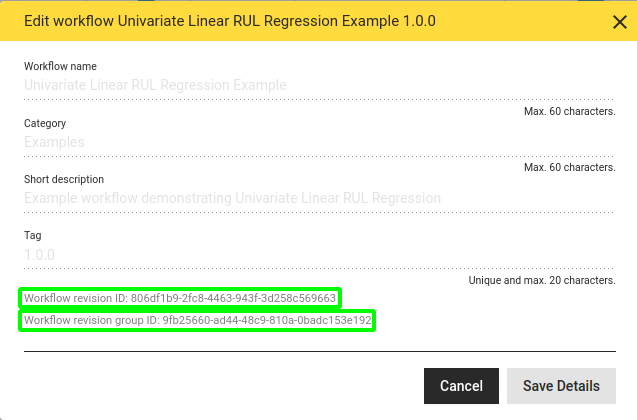
The id of a workflow / component revision as well as its revision group id are shown in the "Edit workflow details" dialog: Open the workflow revision and click on the pencil button in the user interface

Then the id and below it the revision group ID are displayed at the bottom of the dialog window:
Input and output wirings
See the section 'Enumeration "type"' in the specification of webservice endpoints of adapters for the possible values of "type".
The input wirings and output wirings tie inputs of the workflow or component revision to data sources via an adapter (and analogously the outputs to data sinks). Typically ref_id is a source id for inputs (i.e. ref_id_type is "SOURCE") and it is a sink id for outputs (i.e. ref_id_type is "SINK"). Note however that this may differ in the case of metadata. If the adapter provides metadata tied to a sink that should be read into an input the ref_id_type for this input is "SINK" instead, and the ref_id is the id of the sink the metadata is tied to.
Input / output wirings can alternatively be specified more concisely via uri wirings, e.g. an input wiring that uses the pass through int component via the component adapter can be specified via
{
    "uri": "hd://component-adapter/57eea09f-d28e-89af-4e81-2027697a3f0f?input=55",
    "workflow_input_name": "input",
}
Optional parameters
-
run_pure_plot_operators(optional, default value:false): controls whether pure plot operators should be executed. Pure plot operators are operators (i.e. component instances) at any point in the workflow which only have outputs of type PLOTLYJSON.During production executions one often does not want plot outputs. This feature allows to use a workflow with plots in production without the plot computing overhead.
If
run_pure_plot_operatorsisfalsethese operators will not be run and return an empty dictionary{}for every PLOTLJSON outputs instead. -
job_id(optional, by default an arbitrary UUID will be generated): unique identifier which enables checking if the respective execution process is completed and match log messages to a specific execution process.
Response
For both web service endpoints, a successful response contains the result values for those workflow outputs without wiring, since this implies that they are wired with the direct provisioning adapter. Also hetida designer internal types for each output are provided. Outputs wired via adapters do not occur in the response.
{
    "output_results_by_output_name": {
        "output_name_1": 42.2   // JSON VALUE or JSON object
        "output_name_2": {
            "column1": {
                "2019-08-01T15:45:36.000Z": 1,
                "2019-08-02T11:33:41.000Z": 2
            },
            "column2": {
                "2019-08-01T15:45:36.000Z": 1.3,
                "2019-08-02T11:33:41.000Z": 2.8
            }
        }
    },
    "output_types_by_output_name": {
        "output_name_1": "FLOAT",
        "output_name_2": "DATAFRAME"
    }
    "result": "ok",
    "job_id": "89e550f5-4853-489d-a332-e1b68c4d6577",
    ...
}
Furthermore the response can contain detailed error information including tracebacks in the case of exceptions as well as some metrics on execution processing time, loading/sending data times and loaded / dent data amounts. For a full description we refer to the API.
JSON payload Examples
Only "direct_provisiong" for both inputs and outputs
This is the payload for running the Example workflow "Volatility Detection Example" with the default wiring (everything "manual input" respectively "Only Output")
Payload
{
    "id": "79ce1eb1-3ef8-4c74-9114-c856fd88dc89",
    "wiring": {
        "input_wirings": [
            {
                "adapter_id": "direct_provisioning",
                "filters": {
                    "value": "{\"2018-05-19T22:20:00.000Z\":86.9358994238,\"2018-05-19T22:25:00.000Z\":78.6552569681,\"2018-05-19T22:30:00.000Z\":93.515633185,\"2018-05-19T22:35:00.000Z\":96.3497006614,\"2018-05-19T22:40:00.000Z\":83.1926874657,\"2018-05-19T22:45:00.000Z\":69.9740743464,\"2018-05-19T22:50:00.000Z\":90.5433921349,\"2018-05-19T22:55:00.000Z\":97.4750274531,\"2018-05-19T23:00:00.000Z\":101.6738801355,\"2018-05-19T23:05:00.000Z\":85.8482897506}"
                },
                "workflow_input_name": "input_series"
            },
            {
                "adapter_id": "direct_provisioning",
                "filters": {
                    "value": "600.0"
                },
                "workflow_input_name": "threshold"
            },
            {
                "adapter_id": "direct_provisioning",
                "filters": {
                    "value": "180min"
                },
                "workflow_input_name": "window_size"
            },
            {
                "adapter_id": "direct_provisioning",
                "filters": {
                    "value": "center"
                },
                "workflow_input_name": "window_timestamp_location"
            }
        ],
        "output_wirings": []
    },
    "run_pure_plot_operators": false,
    "job_id": "00000000-0000-0000-0000-000000000002"
}
Response (shortened):
Here the only outputs are of type PLOTLYJSON. They may be {} if query run_pure_plot_operators was false. Since both outputs are implicitly wired to the default adapter "direct_provisioning", their output values are returned in the response
{
    "output_results_by_output_name": {
        "data_and_alerts": ...
        "score": ...
    },
    "output_types_by_output_name": {
        "data_and_alerts": "PLOTLYJSON",
        "score": "PLOTLYJSON"
    },
    "result": "ok",
    "job_id": "00000000-0000-0000-0000-000000000002"
}
Mixed example
Here both inputs are wired via the Python demo adapter. One of them is wired to metadata from a node of the adapter's hierarchy. The sample workflow actually has two outputs, only one of which is wired to a sink. The other one, which is not explicitly wired, is thereby implicitly wired to the default adapter "direct_provisioning" and thus provided directly in the response.
{
    "id": "8d61a267-3a71-51cd-2817-48c320469d6b",
    "wiring": {
        "input_wirings": [
            {
                "workflow_input_name": "num_pred_series_future_days",
                "adapter_id": "direct_provisioning",
                "filters": {"value": "1"}
            },
            {
                "workflow_input_name": "pred_series_frequency",
                "adapter_id": "direct_provisioning",
                "filters": {"value": "3min"}
            },
            {
                "ref_id": "root.plantA.picklingUnit.influx.temp",
                "ref_id_type": "SOURCE",
                "type": "timeseries(float)",
                "workflow_input_name": "timeseries",
                "adapter_id": "demo-adapter-python",
                "filters": {
                    "timestampFrom": "2022-05-19T15:24:00.000000000Z",
                    "timestampTo": "2022-05-19T15:24:00.000000000Z"
                }
            },
            {
                "ref_id": "root.plantA.picklingUnit.influx.temp",
                "ref_id_type": "SOURCE",
                "ref_key": "Max Value",
                "type": "metadata(float)",
                "workflow_input_name": "limit",
                "adapter_id": "demo-adapter-python",
                "filters": {}
            }
        ],
        "output_wirings": [
            {
                "ref_id": "root.plantA.picklingUnit.influx.anomaly_score",
                "ref_id_type": "SINK",
                "type": "timeseries(float)",
                "workflow_output_name": "pred_series",
                "adapter_id": "demo-adapter-python"
            }
        ]
    },
    "run_pure_plot_operators": false,
    "job_id": "00000000-0000-0000-0000-000000000002"
}
The response:
{
  "output_results_by_output_name": {
    "intercept": 108.0310580589,
    "slope": [
      0
    ],
    "limit_violation_prediction_timestamp": "NaT"
  },
  "output_types_by_output_name": {
    "intercept": "FLOAT",
    "slope": "FLOAT",
    "pred_series": "SERIES",
    "limit_violation_prediction_timestamp": "STRING"
  },
  "result": "ok",
  "job_id": "00000000-0000-0000-0000-000000000002"
}
Running workflow and component revisions asynchronously
Instead of waiting for the response with the execution result, it is possible to just trigger the execution by sending the execution input in the body and a callback URL as query parameter to the POST web service endpoint
/api/transformations/execute-async
or for the execution of the latest respectively highest revision to the corresponding POST web service endpoints
/api/transformations/execute-latest-async
/api/transformations/execute-highest-async.
The execution result is then sent to the specified callback url in the request body once it has been determined.
The allowed callback urls must be pre-configured for the backend service via the HD_ALLOWED_CALLBACK_URL_PATTERNS environment variable, which allows wildcard characters like ?and *.
Technical notes on execution
Concurrent code execution
While it is allowed to have async component main functions, during ordinary execution of a workflow, operators are not executed concurrently. Analytical operations are typically cpu bound and io bound operations (data loading / sending) should happen in an adapter anyway. This ensures a higher level of reproducibilty for workflow execution and makes it simpler to reason about operation order and state.
On the other side, adapters should make use of async / concurrency for providing or sending data where appropriate. In particular component adapter wirings lead to concurrent execution of the component adapter sources/sinks. Async component main functions are recommended for component adapter components.